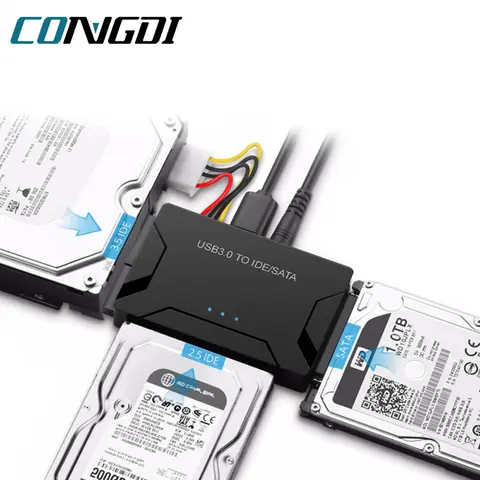
What is an IDE USB Adapter and When Do You Need One?
If you're trying to access data from an old IDE hard drive or transfer files from a legacy computer, you might need an
IDE USB adapter. The short answer is: An IDE
USB adapter is a device that connects an IDE (PATA) hard drive or optical drive to a modern computer via USB, allowing you to read and write data without installing the drive internally.
- IDE (PATA)
- IDE stands for Integrated Drive Electronics, also known as PATA (Parallel ATA), a standard interface for connecting storage devices to a computer.
- USB (Universal Serial Bus)
- USB is a widely used interface for connecting peripherals to computers, known for its plug-and-play functionality and high data transfer speeds.
You might need an IDE
USB adapter in the following scenarios: - You want to recover data from an old IDE hard drive. - You need to transfer files from a legacy computer to a modern one. - You're using an IDE optical drive (CD/DVD) with a modern laptop that lacks an internal drive.
- Identify the type of IDE drive you have (2.5 or 3.5).
- Choose an IDE USB adapter that supports your drive size and interface (40-pin or 80-pin).
- Connect the IDE drive to the adapter and plug the adapter into your computer’s USB port.
- Wait for the drive to be recognized by your operating system and access the data.
How to Choose the Best IDE USB Adapter for Your Drive?
If you're unsure which IDE USB adapter to buy, the short answer is: Look for an adapter that supports your drive size, interface, and includes features like power supply and compatibility with modern operating systems. When choosing an IDE USB adapter, consider the following factors:
| Feature | Description |
| Drive Size Support | Ensure the adapter supports your drive size (2.5 or 3.5). |
| Interface Type | Check if it supports 40-pin or 80-pin IDE drives. |
| Power Supply | Some 3.5 drives require an external power source. |
| Compatibility | Ensure it works with your operating system (Windows, macOS, Linux). |
For example, if you have a 3.5 IDE hard drive from an old desktop, you’ll need an adapter with a power input. A 2.5 drive from a laptop usually works with a USB-only adapter. Also, look for adapters that support both IDE and SATA drives if you plan to use them for multiple purposes.
What Are the Common Issues with IDE USB Adapters and How to Fix Them?
If your IDE USB adapter isn’t working, the short answer is: Check the connections, ensure the drive is powered, and update your drivers. Common issues and their solutions include:
- Drive Not Detected
- Ensure the drive is properly connected and powered. Try a different USB port.
- Slow Transfer Speeds
- Use a USB 2.0 or higher port for faster data transfer.
- Drive Not Recognized by OS
- Install the latest drivers or try a different computer.
Here’s how to troubleshoot:
- Verify that the IDE drive is securely connected to the adapter.
- Check if the drive requires external power (especially for 3.5 drives).
- Try a different USB port on your computer.
- Update your operating system and install any necessary drivers.
- If the drive still isn’t recognized, try using a different IDE USB adapter.
User Reviews and Real-World Performance of IDE USB Adapters
If you're wondering what users say about IDE USB adapters, the short answer is: Most users report positive experiences, especially when using the adapter for data recovery or transferring files from old drives. Based on user feedback and personal experience, here are some common observations:
| Feature | User Feedback |
| Build Quality | Most users find the adapters durable and well-built. |
| Compatibility | Works well with Windows and macOS, but some Linux users report minor issues. |
| Speed | Transfer speeds are generally good for IDE drives, but not as fast as modern SSDs. |
| Power Supply | Adapters with external power are more reliable for 3.5 drives. |
Many users have successfully used IDE USB adapters to recover data from old computers, transfer files to new systems, or even repurpose old drives as external storage. Some have also used them to install operating systems or run diagnostic tools on legacy hardware.
Other Related Products and Uses for IDE USB Adapters
If you're interested in similar products, the short answer is: You might also want to consider
IDE to SATA USB adapters, USB to IDE converters, or IDE drive cables for more flexibility. In addition to the IDE USB adapter, you may also find the following products useful: -
IDE to SATA USB adapter: Allows you to connect both IDE and SATA drives to a USB port. -
USB to IDE adapter: A simpler version of the IDE USB adapter, often used for external drives. - IDE drive cable adapter: Useful for connecting IDE drives to motherboards or other devices. -
IDE to USB converter: A compact version of the IDE USB adapter, ideal for portability. These products are often used in similar scenarios, such as data recovery, file transfer, or hardware testing. If you're working with multiple drive types, an IDE to SATA USB adapter might be a better choice. If you're only dealing with IDE drives, a standard IDE USB adapter should suffice.